

VseeBox is a high-performance media player built for speed and picture quality. It delivers snappy navigation, quick app launches, and smooth playback—so you can spend less time waiting and more time enjoying your favorite apps. Here's a detailed breakdown of how VseeBox works based on the available data and insights from previous models and user experiences.
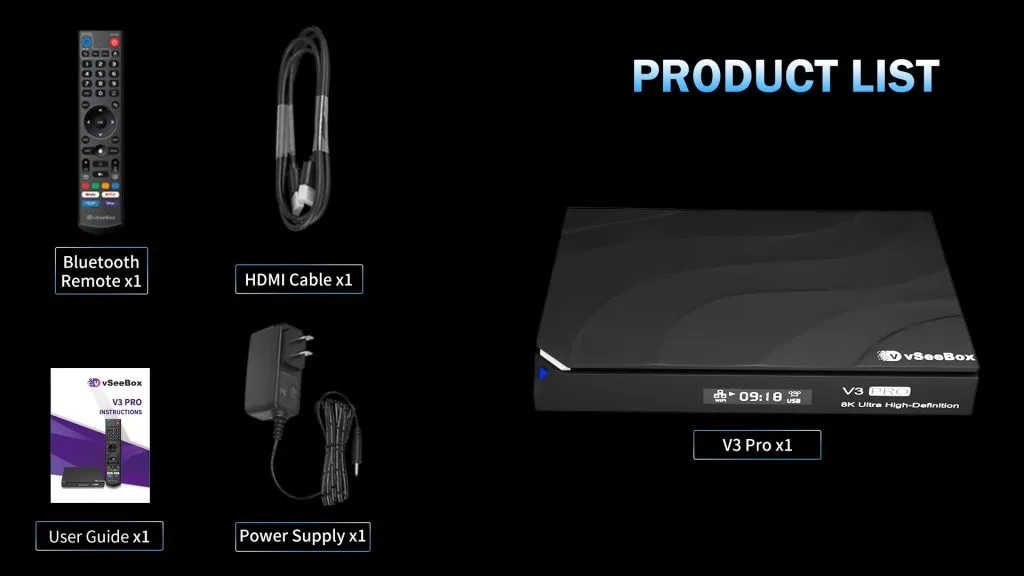
1. Hardware and Setup
VseeBox is a compact set-top box that connects to your television via an HDMI cable. The device itself is powered by a processor that’s capable of handling high-definition streaming content, often in 4K resolution. It typically comes with a remote control, though users can also connect wireless keyboards or other peripherals for easier navigation.
Setup Process:
- Step 1: Connect the VseeBox to your TV using an HDMI cable.
- Step 2: Power the device using the included power adapter.
- Step 3: Connect to your home Wi-Fi network or use an Ethernet cable for a wired connection.
- Step 4: Complete the on-screen setup instructions, which usually involve selecting your language, configuring display settings, and connecting to the internet.
2. Software and User Interface
The VseeBox runs on a customized version of the Android operating system, providing a familiar and intuitive interface for navigating the system and managing your applications.
Key Features:
-
Android OS: Access the official Google Play Store to download and install the apps you choose, including popular streaming, social media, and productivity tools.
-
User-Friendly Interface: The home screen is designed for easy navigation, with customizable layouts to suit your preferences.
-
App Management: Organize your applications, adjust settings, and personalize your experience directly through the system settings.
-
Wide Compatibility: Supports a broad range of Android applications, allowing you to tailor the device to your own needs.
3. Streaming and Performance
VseeBox is optimized for streaming, with most models supporting 4K Ultra HD resolution. It leverages powerful processors and sufficient RAM to ensure smooth performance, even during high-demand streaming sessions.
Streaming Quality:
- Resolution: VseeBox supports various resolutions, up to 8K Ultra HD. It automatically adjusts the streaming quality based on your internet connection speed to avoid buffering.
- Connectivity: With both Wi-Fi and Ethernet options, VseeBox ensures stable connections for uninterrupted streaming.
- Performance: The device is equipped with a capable processor and GPU, making it responsive and efficient in handling multiple apps and streaming high-quality content.
4. Content Access and Legality
One of the main attractions of VseeBox is its ability to stream a wide range of international channels and content. However, it's important to note that the legality of some content streams may vary depending on the user's location and the source of the content.
Legal Considerations:
- Streaming TV Box Services: VseeBox often comes pre-loaded with IPTV services that provide access to channels from around the world. The legality of these services can vary, so users should be aware of the potential risks.
- Geo-Restrictions: Some content may be restricted based on your geographical location. Users can use VPN services to bypass these restrictions, though this may also have legal implications.
5. User Experience and Support
VseeBox is designed to be user-friendly, with a straightforward setup and easy-to-navigate interface. The device receives regular software updates to improve performance, add new features, and ensure security.
Customer Support:
- Online Resources: VseeBox users can find help through online forums, tutorials, and the official support website.
- Community Support: A strong user community often provides additional insights and troubleshooting tips for common issues.
- Updates: Regular firmware updates help keep the device secure and add new functionalities, enhancing the overall user experience.
Conclusion
VseeBox is a powerful and flexible hardware media player designed for users who value speed, a clean interface, and customizable Android performance. With its responsive processor, 4K support, and easy app management, it delivers a smooth experience for the apps you choose to install.
0 comments